tl;dr: Set the itemHeight value to auto and you'll get list items
with dynamic height in Sencha Touch 2.
In the Ext.List component provided by Sencha Touch 2, all SimpleListItem (or ListItem) has the same height. This means if your items each has content of different height, the list would look awkward.
Fear not! Here's a solution (and its discovery).
Load up a Ext.List and inspect one of the item element with Chrome/Safari
developer tool, you'll find its element.style has height: 47px !important;:
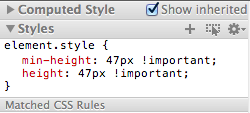
Here's the key: CSS properties under element.style are set by Javascript.
In other words, any attempt to override this property in stylesheet will fail.
(Try it by specifying a height value on div.x-list-item, or any other class
you suspect, if you need some convincing).
So, how do we fix this with Javascript? If you examine the documentaion,
Ext.List has a config option itemHeight with a default value. You can set it
to a value that works best with all potential heights of your item content,
resulting in items with identical heights. Setting itemHeight to auto,
however, will make each item container flow with its inner element, thus
achive dynamic height.