The prospect of Swift being open-source excites me. In preparation for it, I decided to learn a little bit about LLVM. In the offical tutorial, C++ and OCaml are used to create a programming language. So I asked myself: why not Swift? As you'll see in this post, Swift is as good as any language when it comes to leveraging LLVM.
LLVM is an "compiler infrastructure". As a user, that translates to "a set of libraries to help us create programming language and tools". Since this is not an introduction to the LLVM project, it suffices to say that LLVM makes creating programming language easy: give your language in LLVM IR form and you get the rest of a native/JIT language for free, optimization included!
LLVM's default API is in C++. In addition, it officially offers a C wrapper. Lucky for us, Swift is C-interoperable – no bridging necessary :)
Now we arrive at our goal for this post: create an Xcode project that can make calls into LLVM's C API, aka to compile this single line of code:
let module = LLVMModuleCreateWithName("my_module")
I assume you have Xcode 7.1 installed on OS X 10.11, but no more.
1. Getting LLVM
There are a lot of materials on the internet dedicated to setting up an LLVM
environment. As we are not working on LLVM itself, and we are not on some
crazy custom Linux environment (to be fair, it's trivial to set LLVM up on
most major Linux distributions), the pre-built Clang binaries is good
enough. Download and unpack the .tar file somewhere handy in on your hard
drive. For example, I put it at $(HOME)/usr/local/clang-3.4.
Aaaand we're done. We have LLVM.
Sidenote: Xcode installs clang the compiler, but a lot of LLVM tools are missing. That's why we need a separate LLVM/Clang setup.
2. Create an Xcode Project
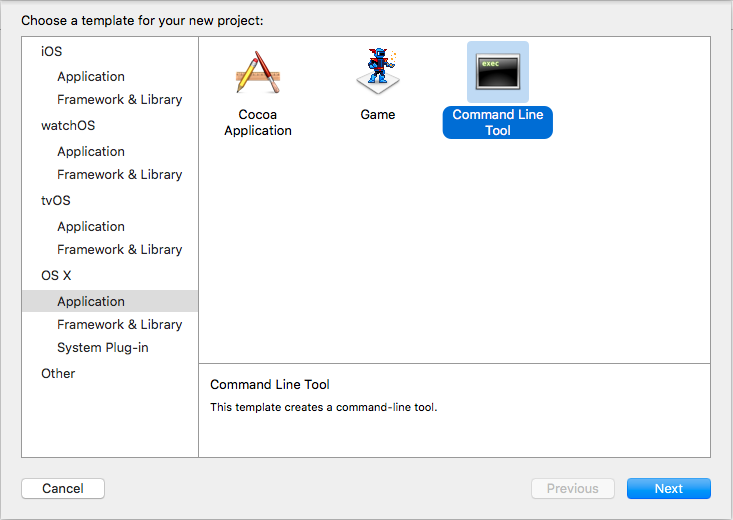
Create a new OS X - Command Line Tool Xcode project, choose Swift as it's language.
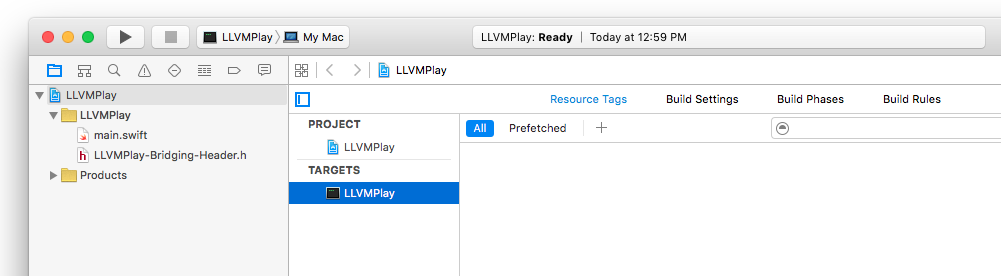
Accessing C stuff in Swift is the same as using your Objective-C classes. So we need to create a bridging header. (I usually create a Objective-C class so that Xcode prompts me for creating the header, then I delete the .h and .m files). The project layout is now:
Import the LLVM headers for its C interface. For our example, this is the entire bridging header:
#import <llvm-c/Core.h>
It's probably a good time to replace content of main.swift with our awesome
LLVM IR-generating code:
let module = LLVMModuleCreateWithName("my_module")
3. Teach Xcode About LLVM
Our code would not compile at this point. Xcode complains that the LLVM header
can not be found. Before you jump to the target build settings, allow me
introduce llvm-config.
It turns out that the compliler flags for building a compiler can get complex
pretty quickly. So LLVM comes with a command that generates them. For me it
lives under $(HOME)/usr/local/clang-3.4/bin. We can ask it for flags that
compiles standard C++, links standard and core libraries like so:
llvm-config --cxxflags --ldflags --system-libs --libs core
(As we use more and more LLVM libraries in the future, the list following
--libs will grow. core is all we need to compile our example). To anyone
who's used GCC/Clang in command line, the output should be pretty
self-explanatory:
-I/Users/drchrono/local/clang-3.4/include  -DNDEBUG -D_GNU_SOURCE -D__STDC_CONSTANT_MACROS -D__STDC_FORMAT_MACROS -D__STDC_LIMIT_MACROS -O3  -std=c++11 -fvisibility-inlines-hidden -fno-exceptions -fno-rtti -fno-common -Wcast-qual
-L/Users/drchrono/local/clang-3.4/lib
-lLLVMCore -lLLVMSupport
-lz -lpthread -ledit -lcurses -lm
I'll walk through how to ask Xcode to respect these.
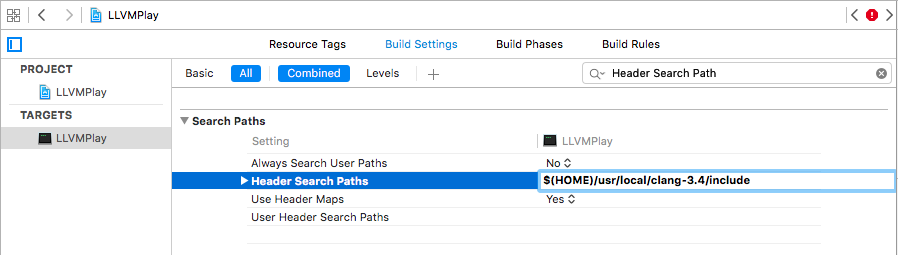
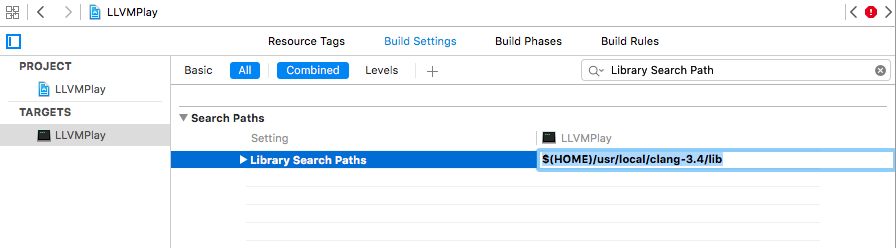
First, go to build settings and set search paths for header files and
libraries according to output from llvm-config. For me that means:
If you try to compile, now Xcode tells you some #define is missing. Again,
we can find them in llvm-config's result. Navigate to "Preprocessing" in
build setting and add those values starting with -D, with out the -D:
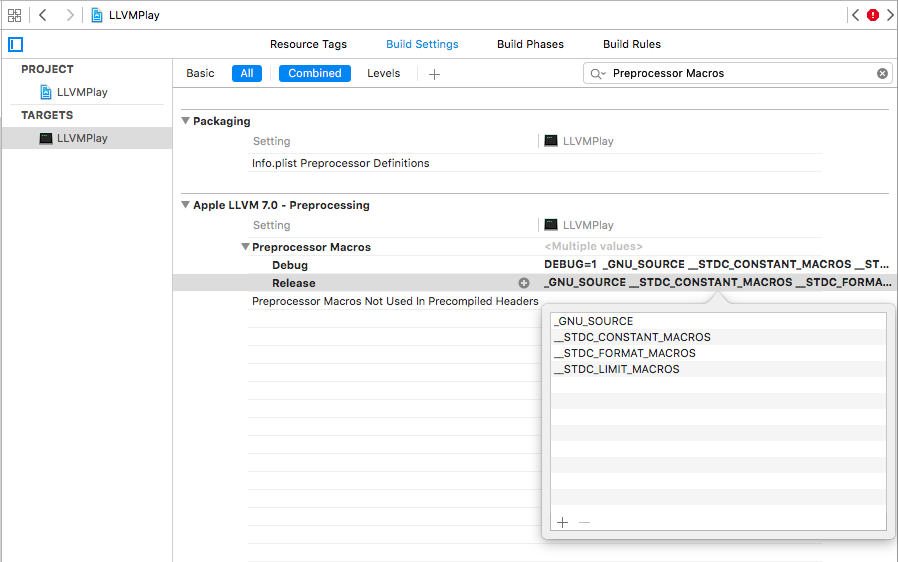
Remember to add these for both "Debug" and "Release".
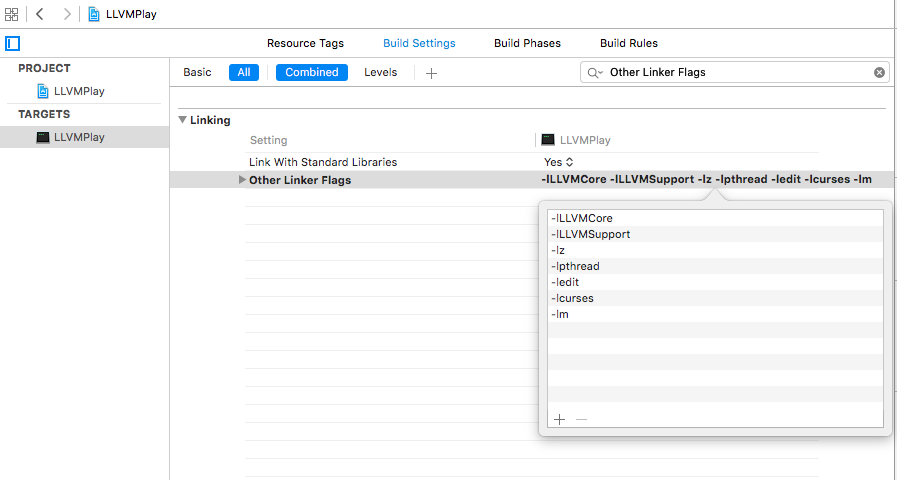
The last step is asking Xcode to link againt the LLVM libraries. Paste in the
-l flags from llvm-config at "Other Linker Flags":
4. Conclusion
Now our Swift LLVM code compiles! Looking back, setting LLVM up with Xcode is no more special than setting up with any C libraries. Hopefully this post will cut down research time for some. Now go create awesome natively languages in Swift!